
Overview
This tutorial explains how to create capturable helipads that allow players to purchase an aircraft (such as the Orca) once captured.
You will set up the helipad object, apply the correct scripts, and configure a terminal that spawns an aircraft above the pad.
The Helipad models and textures are in zip: CapturableHelipads.zip (or at MPF)
1. Create the Base Helipad Object
Temp Object → Simple → Simple_DSAPO_Versions → Simple_MiniConsole
Name it: Capturable_GDI_Helipad

2. Physics Model
On the Physics Model tab:
Click the folder icon and browse to select the helipad model.

3. Settings Tab (Base Helipad)
Set:
- Health:
2 - HealthMax:
500 - Skin:
CNCMCTSkin - ShieldType:
CNCMCTSkin - DamagePoints:
0.750 - DeathPoints:
0.000
Assign its encyclopedia entry:
Click the Letter icon, choose the Helipad name from category Enc, set:
- Encyclopedia Type:
Building

Still on the Settings tab:
- PlayerType:
Unteamed - Radar Blip Type:
Stationary

4. Place the Helipad
Now MAKE your Helipad on the map.

5. Helipad Script
Go to Scripts tab for the helipad and set:
- Type:
z_Capturable_Helipad - Name Parameter of Owner:
-2

Record the ID of the Helipad for later use.

6. Create the Terminal Console
Temp the Simple_MiniConsole and name it:Capturable_GDI_Helipad_Terminal

Terminal Settings
On the Settings tab for the Terminal set
- Skin:
Blamo - Shield Type:
Blamo - DamagePoints:
0.000 - DeathPoints:
0.000
Next, choose the aircraft it will grant:
Click the Letter icon, choose the Orca from the Enc category.

Record the exact multiplayer preset name of the Orca: in our case this would be the original preset aka CnC_GDI_Orca (case-sensitive)

7. Create the Spawn Arrow
MAKE and position a Daves Arrow on TOP of the helipad.
Move it up on the Z-axis until it floats approximately 3 Orcas above the helipad.

Record the ID of the Arrow (do NOT delete the arrow):

8. Add Terminal Script
Return to Helipad Terminal → Properties → Scripts tab
Add the following script:z_Capturable_Helipad_Terminal
With the settings below:
- HelipadID: ID of the helipad object (example:
100000) - Preset: The Orca preset name (
CnC_GDI_Orca) - ArrowID: The ID of the Daves Arrow (example:
100003) - Cost:
900(Orca cost in Renegade)
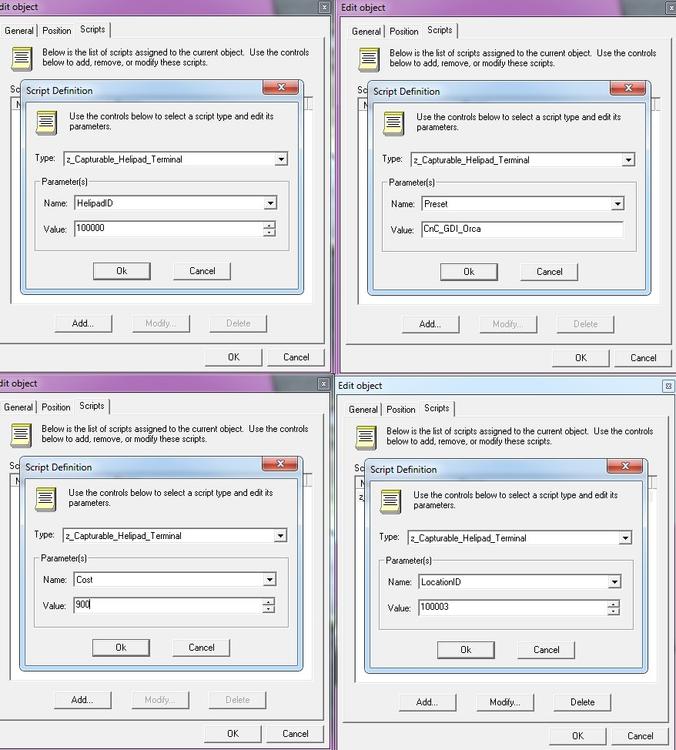
End result should look like this for the Helipad Terminal:

Finished Result
You're done!
