
Overview
This tutorial walks you through how to create capturable Tiberium Silos in your map using a custom preset, proper object settings, and the included script logic.
Required Files: CapturableTiberiumSilos.zip (or at MPF)
1. Create the Base Preset
TEMP a preset into: Object → Vehicle → Mounted
Name it something like Capturable_GDI_Silo.

2. Assign the Physics Model
Go to the Physics Model tab.
- Click the folder icon next to ModelName
- Browse for
gtsilo.W3D - Click Open

Go to the Settings tab and configure the following:
- Health:
2 - HealthMax:
300 - ShieldStrength:
0.000 - ShieldMax:
0.000 - Skin:
CNCMCTSkin - Shield Type:
CNCMCTSkin - DamagePoints:
0.500 - DeathPoints:
0.000 - TranslatedNameID:
IDC_Enc_Struct_GDI_TiberiumSilo_Name(found in the Strings Editor under the Enc category)
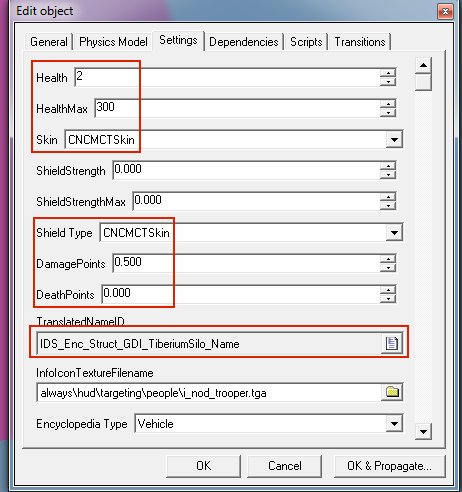
Still on the Settings tab set:
- PlayerType:
Unteamed - Radar Blip Type:
Stationary

3. Add the Capturable Script
Go to the Scripts tab:
- Click Add…
- For Type, browse for:
z_Capturable_TibSilo - Then set:
- Name:
Owner - Value:
-2(which means unteamed)
- Name:

4. Place the Silo in Your Level
- Select your temp preset called
Capturable_GDI_Silo - Click Make
- The silo will now appear in your map
- Save your level and create your
.mixfile
Now people can play your map and capture the silo.

6. Creating the Nod Version
Repeat the entire process for the Nod Tiberium Silo, but set:
- Team:
Nod
That’s all!
Greetz zunnie